No More Icons in Every Menu by Default
Source Entity
Hacker News
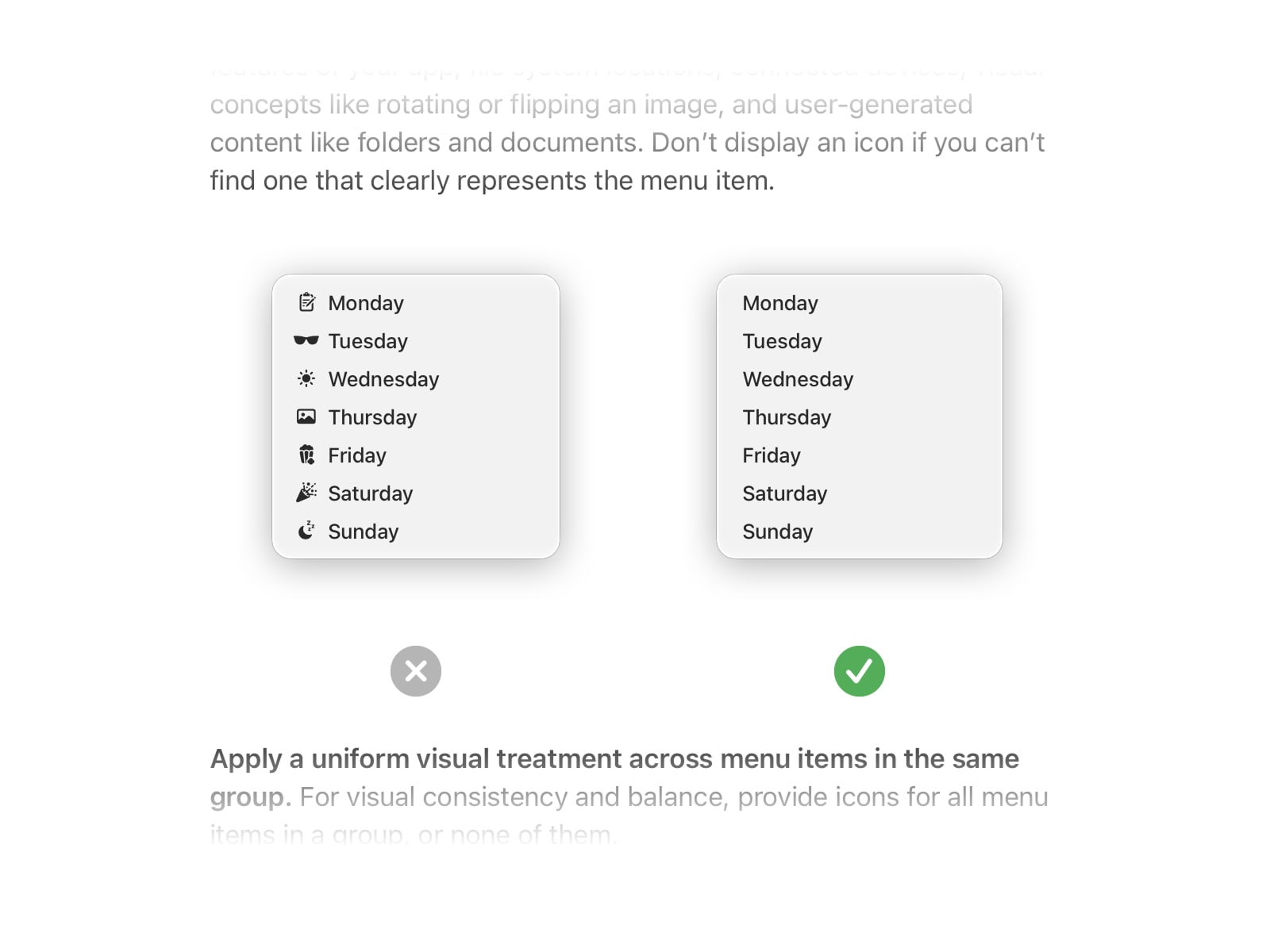
Apple has reversed its controversial decision to include icons in every macOS menu item by default in the latest 'Golden Gate' release. This move aligns with updated Human Interface Guidelines that explicitly discourage the practice to maintain visual clarity.
The Return to Minimalist Interface Design
Apple’s recent decision to remove mandatory icons from all macOS menu items—a feature introduced in the 'Tahoe' release—marks a significant pivot in the company’s design philosophy. For power users and UI/UX designers, the inclusion of icons in every dropdown menu was often viewed as a cluttered departure from the classic, text-centric macOS aesthetic that prioritized rapid scanning over visual ornamentation.
The Role of Human Interface Guidelines
Central to this shift is the role of Apple’s Human Interface Guidelines (HIG). John Gruber’s reporting highlighted that Apple has effectively updated its internal documentation to cite the 'Tahoe' approach as a design anti-pattern. By codifying this in the HIG, Apple is not just making a cosmetic change; it is setting a standard for developers that emphasizes legibility and cognitive load reduction, ensuring that menu navigation remains functional rather than decorative.
Impact on UI Consistency and User Experience
When Apple adopted the icon-heavy menu style in 'Tahoe,' it inadvertently weakened the argument for minimalist design across the software ecosystem. Many developers followed Apple’s lead, assuming that icons were the new standard for modern UI. Now, with the 'Golden Gate' release reverting to the cleaner, text-only default, the industry is seeing a correction that reinforces the importance of visual hierarchy. Icons, when used sparingly, are helpful, but their ubiquity often leads to 'visual noise' that hinders productivity.
Corporate Humility and Design Evolution
There is a broader implication regarding corporate design cycles: the willingness to admit that a specific UI experiment failed. It is rare for a major technology firm to walk back a system-wide design choice so explicitly. By reverting this change, Apple demonstrates that it is listening to feedback from its professional user base, who generally prefer the high-density information display of text-based menus over the bloated look of icon-laden lists.
Future Trends in macOS Development
Looking ahead, this reversal suggests that future macOS iterations will likely double down on 'functional minimalism.' As Apple continues to integrate more complex features into its operating system, the demand for clean, predictable interfaces will only grow. Developers should interpret this move as a signal to prioritize clarity and accessibility over aesthetic trends that do not serve the core utility of the operating system.
Conclusion: A Victory for Functionality
Ultimately, the removal of default menu icons in 'Golden Gate' is a win for the long-term usability of the macOS platform. It signifies a return to the roots of desktop computing, where efficiency and speed are paramount. By aligning its software behavior with its own rigorous design guidelines, Apple has restored a sense of consistency that will benefit both third-party developers and end-users alike.